1
Upload Any Photo
Drag in a portrait, pet, logo, or product shot. JPG, PNG and WEBP up to 10MB — straight from your phone or desktop.
Transform any photo into a clean vector file. AI extracts lines and shapes automatically. Perfect for logos, portraits, and artwork.
Updated · Free · No signup
Drop your photo here
or click to browse
PNG, JPG, WEBP up to 10MB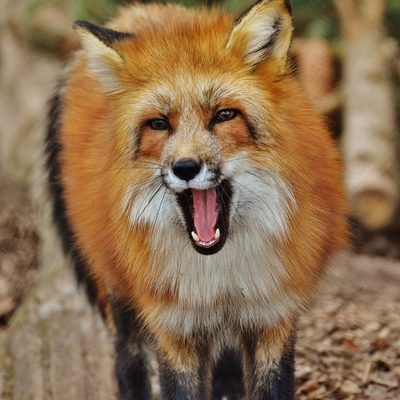
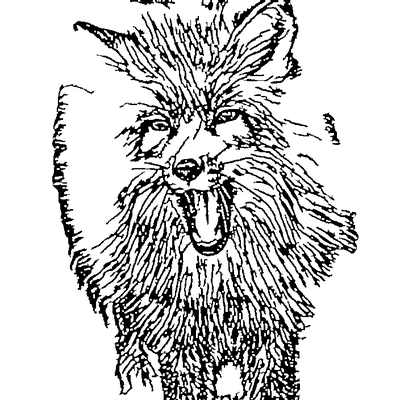
A photo is a raster image — a fixed grid of coloured pixels. Zoom in and it turns into blurry squares. A vector describes the same picture as mathematical paths and curves, so it stays razor-sharp at any size, from a business card to a billboard.
Converting a photo to vector means tracing the meaningful edges, shapes and tones of your image and rebuilding them as clean, editable paths. Done by hand in Illustrator this takes hours of pen-tool work. Our AI pipeline does it automatically: it removes the background, extracts the lines that actually define your subject, filters out noise, and exports ready-to-use SVG paths you can scale, recolour and cut.
The result is a single SVG file that works everywhere — design software, cutting machines, laser engravers and the web — without the bloat or quality loss of a pixel-based image.
AI handles the complex image processing automatically
Drag in a portrait, pet, logo, or product shot. JPG, PNG and WEBP up to 10MB — straight from your phone or desktop.
Frame the part you want vectorized. Tighter crops give the AI a clearer subject and produce cleaner vector paths.
Background removal, edge detection, noise cleanup and path generation run automatically — no manual pen-tool work.
Get a scalable SVG with clean paths, ready to recolour, resize, cut, or engrave in any software.
Skip manual tracing in Photoshop and Illustrator. The AI handles background removal, lineart extraction and vectorization end to end.
Because the result is true vector paths, it stays crisp at any size — from tiny stickers to large-format prints and signage.
Adjust thresholds, line detail and cleanup, and preview each stage of the pipeline in real time before you export.
Remove stray paths, fix details and refine your subject in the browser — no separate vector app required.
Tuned to keep the features that make a face, pet, or logo recognisable while dropping distracting background detail.
Standard SVG paths open cleanly in Illustrator, Inkscape, CorelDRAW, Figma, Cricut, LightBurn and EZCAD.
Convert portrait photos into clean vector art for printing and merchandise.
Learn more →Photo to vector conversion transforms raster images (photos made of pixels) into vector graphics (made of mathematical paths). Vectors can be scaled infinitely without losing quality, making them ideal for printing, cutting, and engraving.
You get a clean SVG (Scalable Vector Graphics) file. SVG is universally compatible with all vector editing software, cutting machines, and laser engravers.
Yes, the photo to vector converter is completely free. No signup, no watermarks, no limits on conversions.
Photos with clear subjects and good contrast work best. Portraits, logos, simple objects, and high-contrast images produce the cleanest vectors.
Yes! Our built-in editor lets you clean up lines, remove artifacts, and fine-tune the vector before downloading. You can also adjust processing parameters for each step.
Upload your image now and get a professional vector file in seconds